16 modules included – from processes, tasks and wiki to boards, portfolio and assets, automations and forms.
AI assistant Robert
Robert creates wiki pages from ticket histories and project plans from a short description – with your own language model if you prefer.
SaaS or on premises
In the cloud or on your own servers with Docker or Kubernetes – including single sign-on via SAML and backups to your own server.
Customisable without coding
Your own issue types, fields, workflows, forms and asset schemas – the platform adapts to your processes, not the other way round.
From planning to portfolio
IPMA planning with Gantt charts, work breakdown structure, risks and baselines, plus resource planning and a portfolio with management letters.
Open to your tools
Automations with Slack, Microsoft Teams, Jira, GitHub and other systems, a documented REST API and MCP for AI assistants.
A look inside
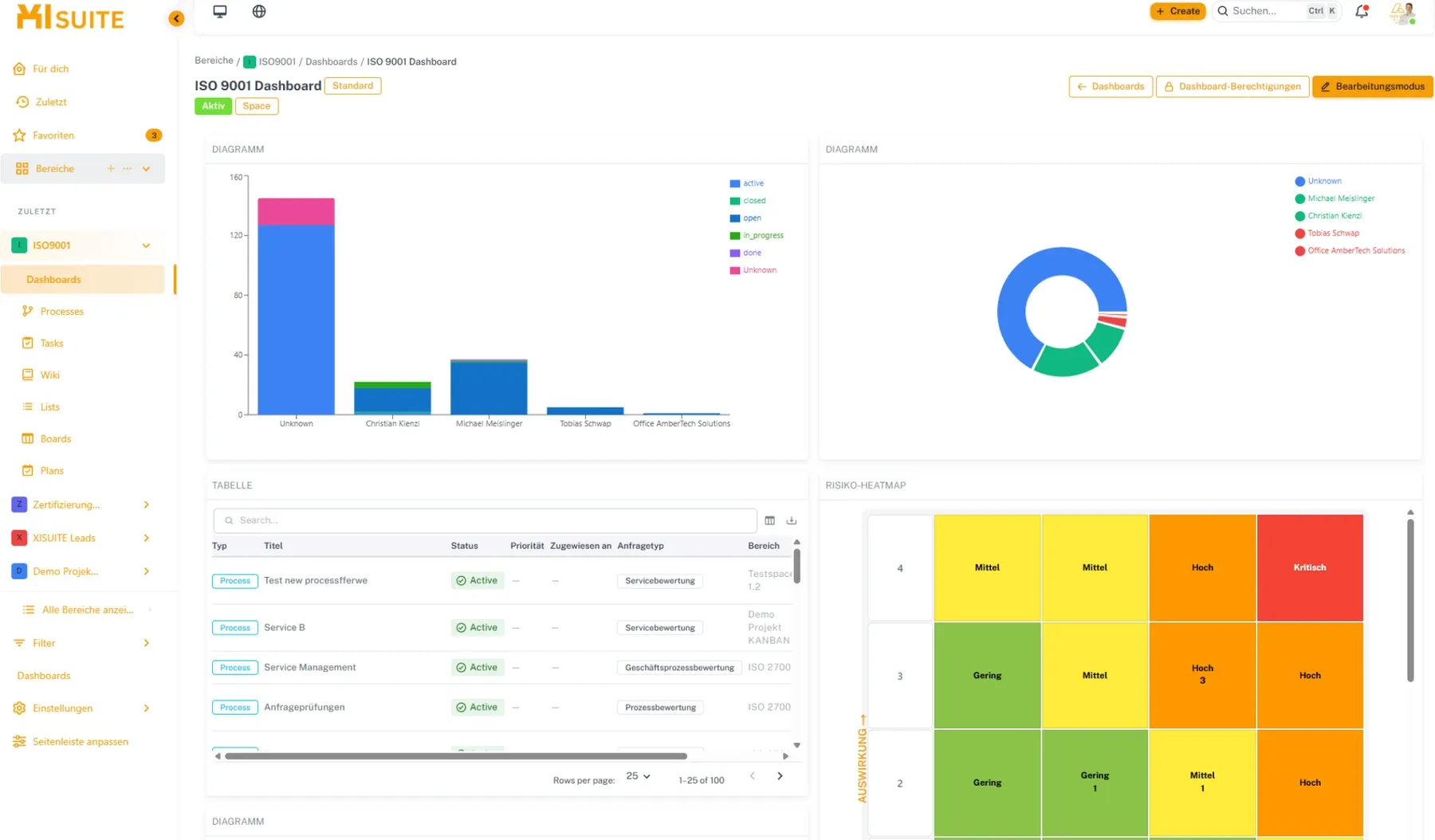
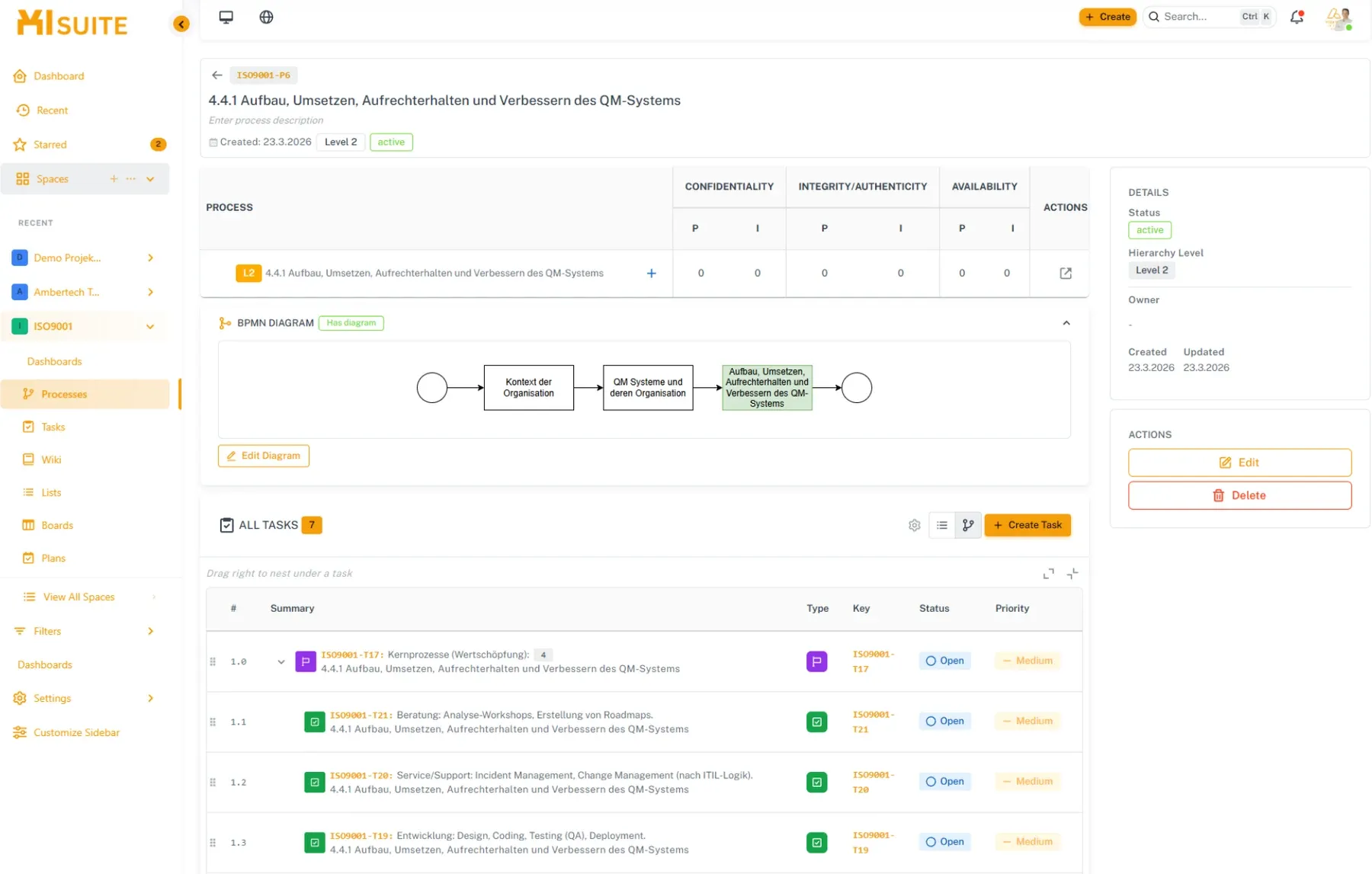
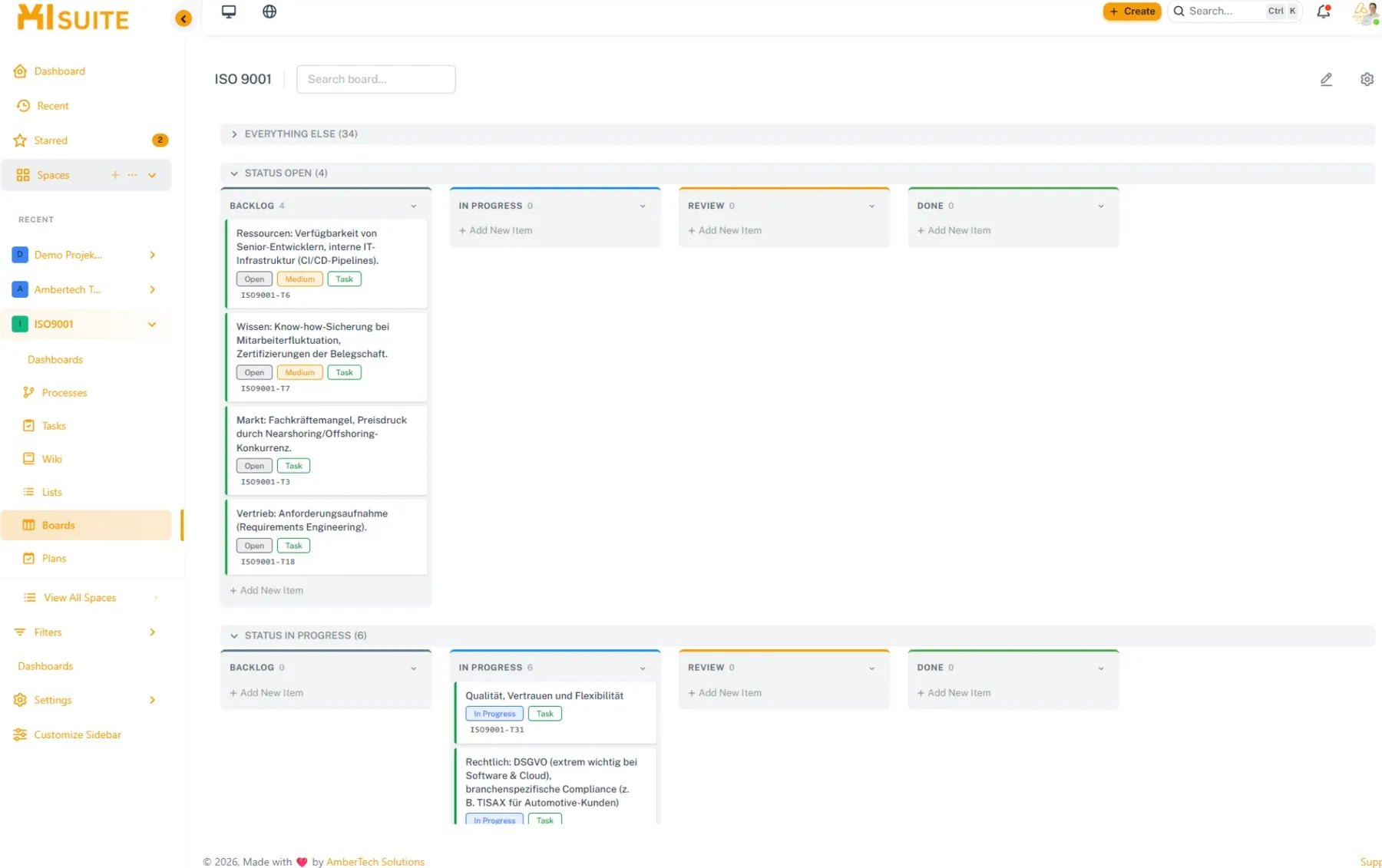
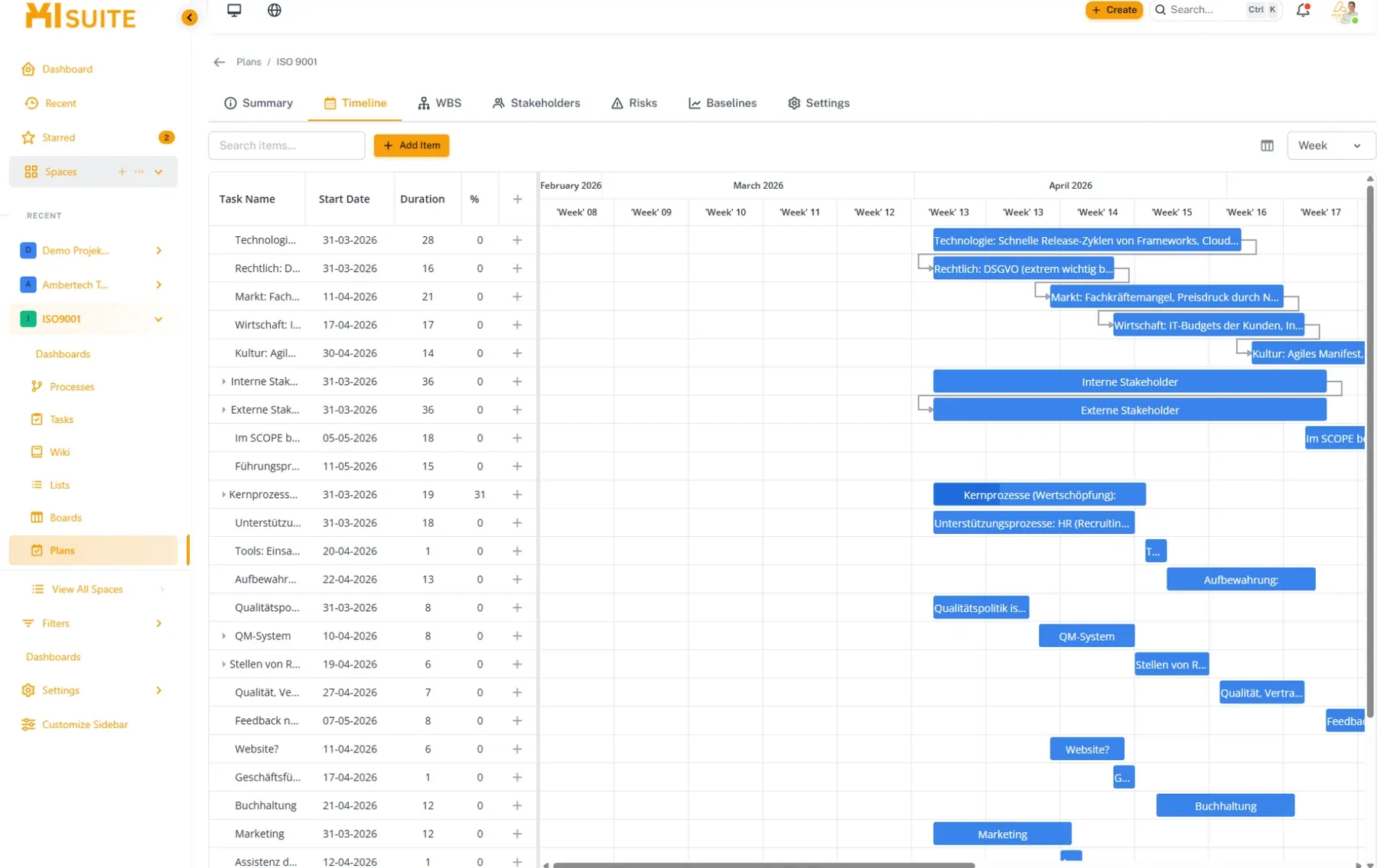
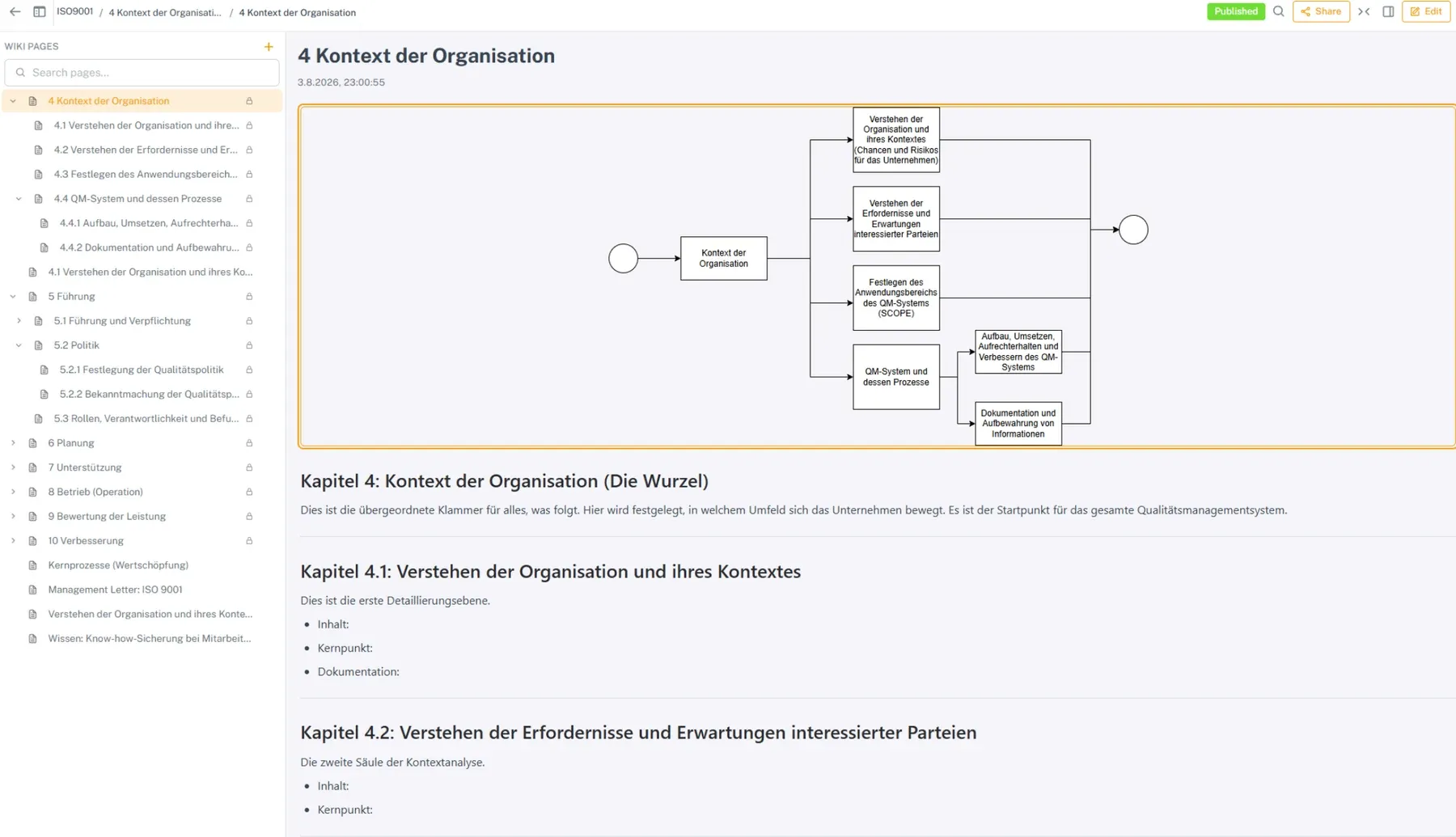
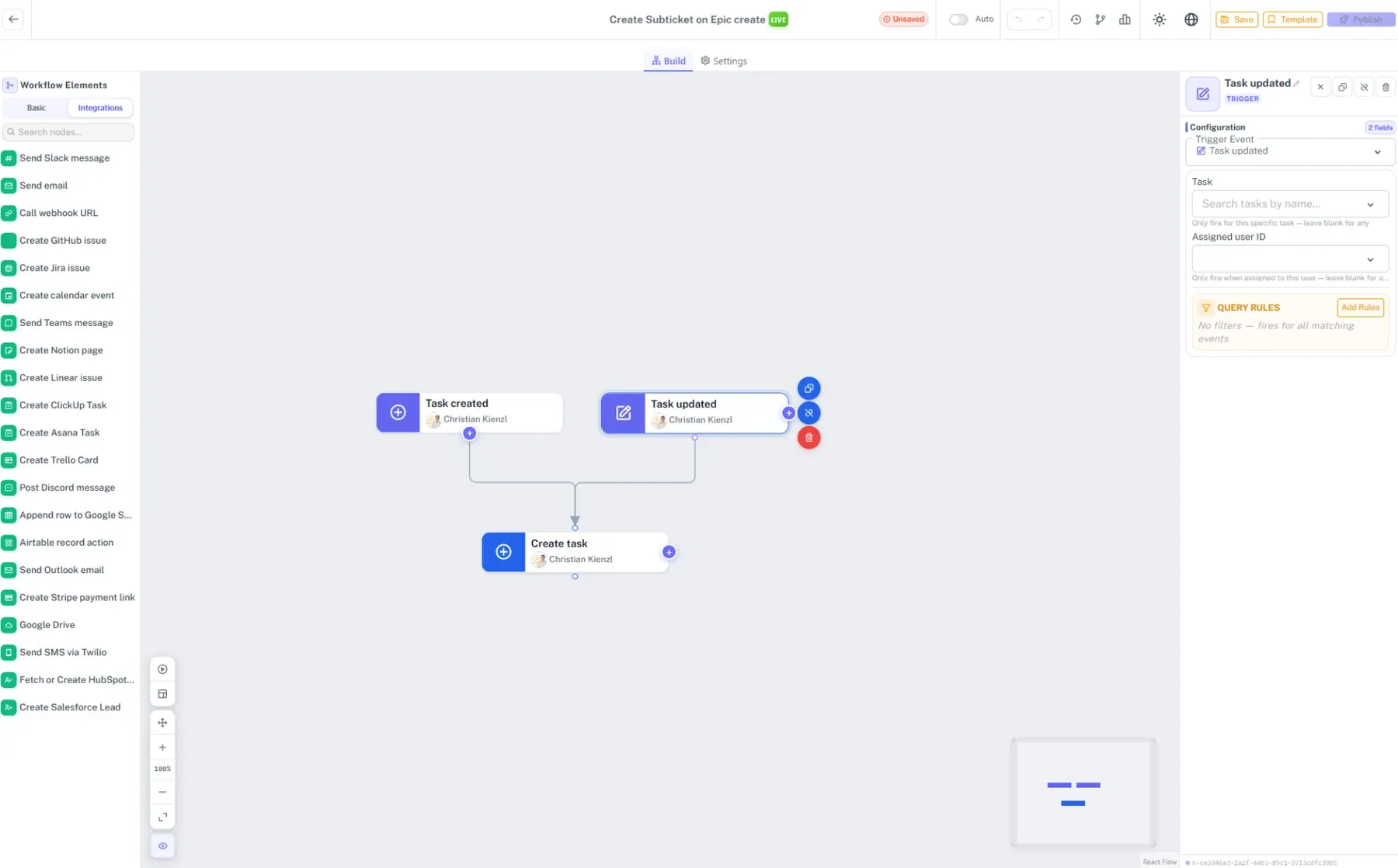
Dashboard with charts, table and risk heat mapProcess with BPMN diagram and linked tasksKanban board with swimlanes by statusIPMA planning with Gantt chart and dependenciesWiki page with an embedded process diagramAutomation in the visual editor with integrations
One platform instead of tool sprawl
XISUITE brings process management, ticketing, knowledge, planning and automation together in one system. Everything is connected: tasks belong to processes, wiki pages to tasks, assets to tickets – without media breaks and without exports between tools. Whether you work in an agile or a traditional way, the platform adapts to your methodology.
The standard package includes dashboards, processes, tasks, boards, lists, wiki, plans, portfolio, Site Studio, files, automations, assets, resource planning, Form Builder, Document Designer and the AI assistant Robert.
The modules at a glance
Processes and tasks
Map your process landscape one to one – with the depth you need per area; every level can be backed directly with tasks.
Your own issue types – from bug tickets to investment requests and customer enquiries, with custom fields and field groups.
Workflows per issue type – statuses, transitions, conditions and validators in a visual editor.
Permissions down to field level – control visibility and editing per field group.
Boards and dashboards
Scrum and Kanban – configure columns, swimlanes, layout sets and quick filters with simple filter logic.
One issue, one truth – changes are instantly in sync across all boards and lists.
Unlimited dashboards – with widgets such as tables, charts, time reports, assets or risk matrices, and permissions per user and role.
Planning, resources and portfolio
IPMA planning – Gantt charts with dependencies, critical path and milestones, a work breakdown structure, risk and stakeholder management, and baselines for plan-versus-actual comparisons.
Resource planning – staff, capacities, budgets and equipment across all projects on one screen.
Portfolio – set priorities, compare plans on a timeline, management letters for leadership and dashboards with resource utilisation and budgets.
Knowledge, files and websites
Wiki – with draw.io diagrams, links to tickets and processes, inline comments, an approval workflow, version history and page-level permissions.
Files – central file storage inside the platform, usable in the wiki and Site Studio, with sharing links and storage quotas.
Site Studio – build an intranet or documentation site from ready-made blocks, with forms, wiki and task lists, in your corporate design and under your own (sub)domain.
Forms, documents and assets
Form Builder – complex forms with if-then logic and a built-in approval process, linked to tickets and embeddable in Site Studio.
Document Designer – design export templates in a visual editor and output them as PDF, Word documents or wiki pages.
Assets and lists – your own schemas and objects, linked to each other and to tickets, with calculated fields, a REST API and import from Excel or CSV.
Automation
Automate routine work – in a visual editor, with monitoring of every single run.
Connect external systems – such as Slack, Microsoft Teams, email, SMS, GitHub, Jira, Linear, ClickUp, Notion or Google Drive.
Templates – save proven automations and reuse them.
AI assistant Robert
Documentation at the push of a button – Robert creates wiki pages from ticket histories and structures project plans from a short description.
Bring your own model – use common AI APIs or a self-hosted language model in your own infrastructure.
MCP integration – through the Model Context Protocol, XISUITE becomes a secure data source for your AI models and assistants.
Operations, security and interfaces
SaaS or on premises – in the cloud or on your own servers, with Docker or Kubernetes.
Single sign-on – sign in via SAML through your existing identity solution.
Backup & restore – scheduled, encrypted backups to your own SFTP server and restores whenever needed.
API first – a documented REST API is available for integrations (API documentation).
Space templates – save a configured space as a template and set up new spaces in no time.
Migration
Existing standard products can be moved to XISUITE with a one-click, guided or standard migration. For heavily customised systems, we work out a suitable migration concept:
1
Analysis
We review the scope, complexity and custom developments of your environment and consider clean-up opportunities.
2
Design
We work out the specific migration concept and the individual migration tasks.
3
Migration
Your existing environment is moved to XISUITE based on the migration tasks.
Licensing
€28 per user per month (net, plus hosting) – all standard modules included.
Expandable per project – additional licences for the duration of individual projects, billed per licence.
From 1,000 users we offer tailored licensing.
AI usage – you provide the tokens for AI features through your own API key.
Roadmap 2026
Recently released: on-premises operation, portfolio, automations, migration, assets, file explorer, resource planning 2.0, Form Builder, space templates, backup & restore, Document Designer, MCP integration and single sign-on via SAML.
In progress: chat with XISUITE, a calendar for processes, tickets and SLA deadlines, notes anywhere in the application (Every Note) and the native Gemini integration for Robert.
Planned: digital signatures with sproof directly in XISUITE, Git and pipeline integration, and test management.
Your path to ISO certification
Fast, flexible and transparent: by combining an intelligent ticket system with a structured wiki, you build your certification – for example according to ISO 9001 or ISO 27001 – step by step and carry it out with ease.
Standard chapters as a process hierarchy – the requirements of the standard are mapped directly as processes.
Protection needs per process – confidentiality, integrity and availability are assessed for each process.
BPMN diagrams – workflows are modelled directly on the process.
Linked tasks – measures end up as tasks exactly where they belong.
This way you always keep full track of where your certification stands.
Learn more
You will find all details and news about XISUITE at xisuite.cloud. We are happy to answer your questions directly – by phone on +43 660 88 14 000 or by email at office@xisuite.cloud.
Frequently asked questions
Your question is not listed? Get in touch directly: Contact
What is XISUITE?
A business management platform that brings together processes, tasks, wiki, boards, planning, portfolio, assets and automation – with the AI assistant Robert. All 16 modules are included in the standard package.
Does XISUITE run in the cloud or on our servers?
Both. XISUITE is available as SaaS or for your own servers with Docker or Kubernetes – including single sign-on via SAML and encrypted backups to your own SFTP server.
How much does XISUITE cost?
€28 per user per month (net, plus hosting), all standard modules included. Additional licences for individual projects are possible, and from 1,000 users we offer tailored licensing.
What can the AI assistant Robert do?
Robert creates wiki pages from ticket histories and structures project plans from a short description. You can use common AI APIs or a self-hosted language model; you provide the tokens through your own API key.
Can we switch from our current tool?
Yes. Standard products can be moved with a one-click, guided or standard migration. For heavily customised systems we work out a migration concept – from analysis and design to the migration itself.
Can XISUITE be connected to other systems?
Yes. Automations connect Slack, Microsoft Teams, Jira, GitHub and other systems, complemented by a documented REST API and MCP for AI assistants.
Is XISUITE suitable for ISO certifications?
Yes. The chapters of the standard are mapped as a process hierarchy, protection needs are assessed per process and measures are managed as linked tasks – for example for ISO 9001 or ISO 27001.
From document to data record – intelligent & automated
AI-based data extraction from PDFs, scans, photos and more – context-driven instead of rule-based, with human in the loop, as a cloud API or on premises.